ExpManager
ExpManager plans BARDOT experiments. Before any dish goes into the instrument, it enters the experiment's plates in the database - each with its name, a unique barcode, the organism, the medium and the rest of its description - and prints a barcode label for every dish. When the dishes are scanned, BacBuster takes each plate's description from the database by its name or its barcode, so nobody has to type it at the instrument.
This manual describes ExpManager version 1.2 (Windows 64-bit). Its title bar calls it Protocol.
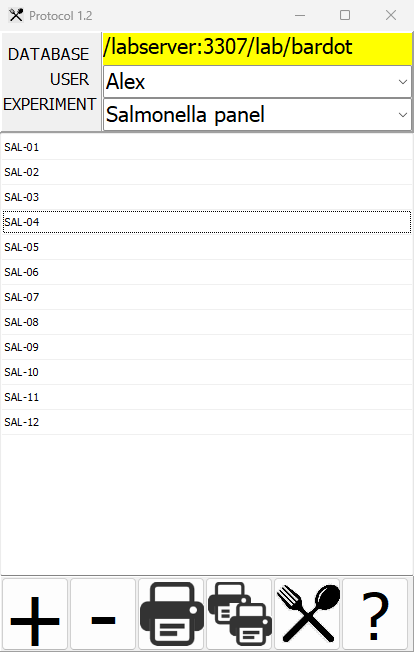
What ExpManager does
Lists an experiment's plates. Choose the database, the user and the experiment; the window lists the experiment's plates.
Adds plates. Each new plate gets a barcode of its own, made from the date and time, and the description you give it - all saved to the database as an empty plate, waiting to be scanned.
Removes plates that have not been scanned yet.
Prints labels. One label per dish, with the plate's name, its barcode, the experiment and the user, on a label printer.
Finds plates by barcode. Scan a dish's label with a barcode scanner and ExpManager shows its experiment, with the plate highlighted.
Where to start
-
New to ExpManager? Read The window, then Planning plates.
-
No database yet? See Connecting to a database.
-
Setting up a label printer? See Printing labels.
-
Ready to scan? See Scanning planned plates.
Words used in this manual
| Word | Meaning |
|---|---|
| Plate | One dish of the experiment, with its name, barcode and description |
| Planned plate | A plate entered in the database but not scanned yet: it has a description but no image |
| Experiment | A named group of plates, of one user |
| User | Who the plates belong to |
Conventions used in this manual
| Convention | Meaning |
|---|---|
| Bold | A button, field or check box you can see on screen |
Monospace |
A file name, folder name or literal value |
Asking for help inside ExpManager
F1 opens the page of this manual about whatever is under the mouse. The ? button at the bottom right of the window opens its front page.