Planning plates
A planned plate is a plate entered in the database before it is scanned: a name, a barcode and a description, but no image yet. Plan every dish of an experiment this way, print the labels, and scanning becomes a matter of putting dishes into the instrument.
Adding a plate
- Choose the USER and the EXPERIMENT at the top of the window - or type a new experiment's name.
- Click +. The Plate Info dialog opens, with the user and the experiment filled in and a new barcode.
- Type the plate's name, and fill in the rest of its description.
- Click the big + in the dialog. The plate is saved to the database and appears in the list.
- The dialog stays open with a new barcode, for the next plate: change the name, click + again, and so on. Close when you are done.
The Plate Info dialog
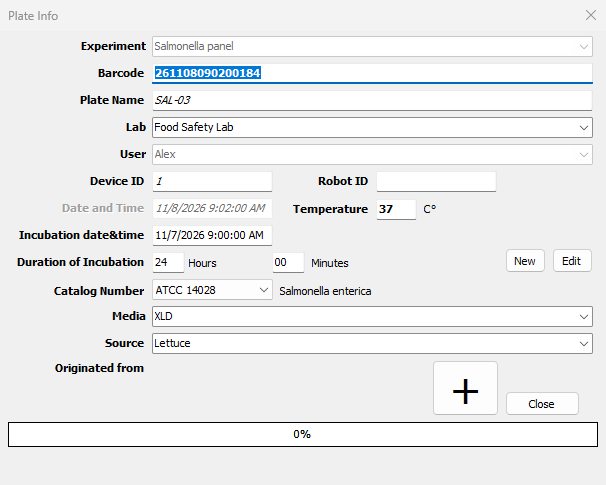
| Field | Meaning |
|---|---|
| Experiment, User | From the main window; they cannot be changed here |
| Barcode | A new number for every plate, made from the date and time - 261108090200184 is 2026-11-08 09:02:00.184. You can type another; it must be unique |
| Plate Name | The plate's name. Names should be unique within the experiment |
| Lab | The laboratory |
| Device ID, Robot ID | Left as they are; BacBuster fills them in when it scans the plate |
| Date and Time | When the plate was entered |
| Temperature | Incubation temperature, °C |
| Incubation date&time | When the dish was plated |
| Duration of Incubation | Hours and minutes of incubation expected before the scan |
| Catalog Number | The organism, chosen from the database's list; its name shows beside it |
| Media | The medium |
| Source | Where the sample came from |
| Originated from | Click to choose the colony, on another plate, that this plate was grown from |
Lab, medium and source can be chosen from the lists or typed; a new name is added to the database. The dialog remembers what you typed for the next time.
Organisms
New opens the Organism dialog to add an organism to the database: its Catalog Number and its Genus, Species, Subspecies, Serotype, Pathotype, Resistance and Pathogenicity. Each list offers the names already in the database; type a new one to add it. Edit changes the organism chosen.
Removing a plate
Select a plate and click -. It is removed only if it has not been scanned: Plate "..." is not empty means BacBuster has already saved a scan of it, and that is kept. To remove scanned plates, use the Database Control Panel of BacBuster or Baclan.
Plates with the same name
A plate is identified by its name and its barcode together. Adding a plate under the name and barcode of a planned plate replaces that one; under the same name with another barcode, it is a second plate, listed twice.