PCA, tSNE, UMAP and the autoencoder
The PCA tSNE UMAP etc tab maps the colonies of the Test Set onto a plane, one point per colony, so that colonies with similar features fall near each other. It uses the filters and features chosen on the Features tab, each feature normalised, and needs at least four colonies. No model is involved, and none is changed.
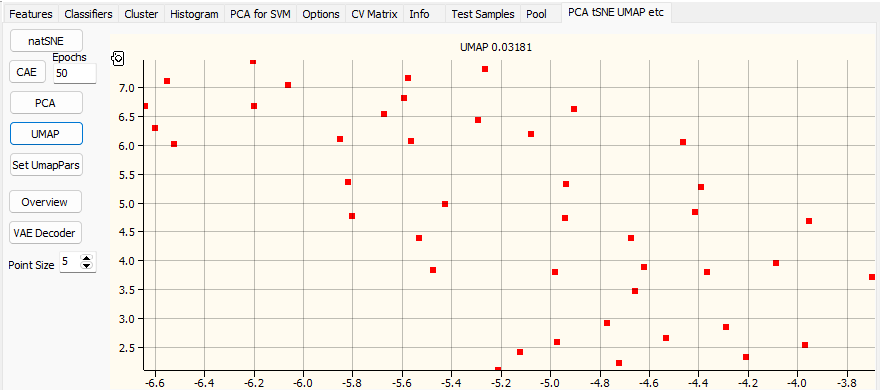
| Button | Method |
|---|---|
| natSNE | tSNE, by FIt-SNE. A plate with few colonies gets a smaller perplexity by itself |
| CAE | A contractive autoencoder, trained on the colonies for the number of Epochs beside it |
| PCA | The first two principal components |
| UMAP | UMAP, with the settings of Set UmapPars |
| Set UmapPars | The UMAP Parameters dialog: the parameters of umap-learn, by their names. Set Defaults brings back the defaults. The metric can be euclidean, manhattan, cosine or correlation |
| Overview | Thumbnails of the colonies, one row per class |
| VAE Decoder | Opens the Scatter Generator |
| Point Size | The size of the points |
tSNE, UMAP and the autoencoder run in the background, one at a time. The button reads Stop while its method runs, and the status bar shows how far it has got. Press it to stop. The chart clears when a method starts and is drawn when it ends; if the plates changed meanwhile, Baclan says to run it again.
The chart's title names the method, with a number: how far the distances on the map differ from the distances between the features. Smaller is better, for comparing methods on the same colonies.
Each point has the colour of its plate. Double-click a plate in the Test Set tree to change it, for the next map drawn.
Picking colonies on the map
Click a point to make its colony active: its plate image, thumbnail and table row follow.
To gate a group of points:
- Hold Shift and click on the chart where the outline should start.
- Click for each further corner.
- Right-click to finish.
The colonies inside become class 1, those in a second outline class 2, and so on; all the others are class 0. Their circles on the plate image change colour accordingly.
| To | Do |
|---|---|
| Move an outline | Drag it. The classes follow when you let go |
| Move one corner | Drag the corner |
| Rotate an outline | Drag it with the right button |
| Delete an outline | Ctrl + click it. The classes follow with the next change |
| See its colonies | Hold the mouse over it: a strip of their thumbnails opens |
These classes are for looking: they stay with the Test Set and do not change the model.
The Scatter Generator
VAE Decoder opens a window that draws scatter images from a decoder network, with a slider for
each of its inputs. Choose the decoder from the list, from the .json files in
%APPDATA%\Baclan\Keras\Decoders. The list is empty unless you have put decoders there.