Your first classification
This walk through trains a model on plates of known organisms and uses it on a new plate, all from folders on disk. You need plate folders written by BacBuster or Baclan: at least one for each of two organisms, and one more to classify. More plates per class make a better model.
1. Get ready
Check the top toolbar:
- The switch beside the database name shows its red no-entry sign. If it does not, click it: Baclan is now working with files.
- The mode says Training Mode. If it says Test Mode, click the words.
2. Make the classes
- Click Add Class, the first button of the Training Set toolbar. Type a name, for example
Listeria, and press OK. The class appears in the tree. - With the class selected, click Import Directory, the fourth button, and choose a plate folder. The plate appears on the left and its colonies below.
- Repeat for the other plates of this class, then make the next class the same way.
Look through the thumbnails. Untick any colony that does not belong - a blown-out spot, a scratch, a merged pair - and it is left out of the training.
3. Choose filters and features
Open the Features tab:
- Under Filters, tick Histogram Equalization.
- Under Features, tick Zernike Moments, click its name, and set Order to
20in the table beside it. - Tick Haralick, click its name, and set Distance to
1and Number of Levels to64.
The chart on the right draws the features of the active colony, and they change as you change the settings. See Filters and features.
4. Train
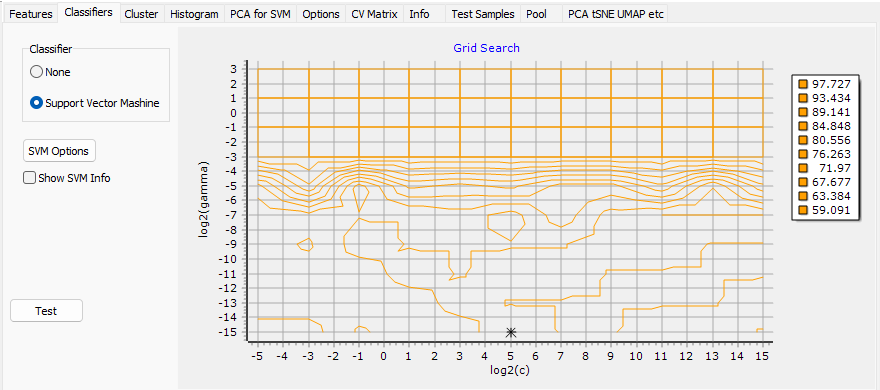
Click Train the Classifier, the mortarboard, the sixth button. Baclan calculates the features of every ticked colony, searches for the best SVM parameters and cross-validates the result, with a progress window for each stage. It ends on the Classifiers tab, where the Grid Search chart marks the parameters it chose with a star.
5. Check the result
Open the CV Matrix tab. Each row is a class, each column what cross-validation called its colonies, in per cent with % ticked. A good model has large numbers on the diagonal.

See Cross-validation.
6. Save the model
Click Save Model, the floppy disk, the eighth button, and give it a name. The file, a .dbp,
holds the images as well, so that the model can be trained again.
7. Classify a plate
- Click Training Mode on the toolbar. It now says Test Mode.
- Click Import Directory, the second button of the Test Set toolbar, and choose the plate to classify.
- Click Classify, the sixth button, the tree diagram.
The table now shows a class and a probability for every colony, the circles on the plate image are coloured by class, the legend counts them, and the PCA for SVM tab shows where the colonies fall among the classes of the model.
8. Keep the result
Click Save the report, the floppy disk of the Test Set toolbar. Baclan makes a folder
Report01 inside the plate's folder, with the table as Colonies.txt and the plate image as
PlateImage.jpg. See Reports.