Training the SVM
Baclan classifies with a support vector machine, using libsvm. Work on the Classifiers tab.
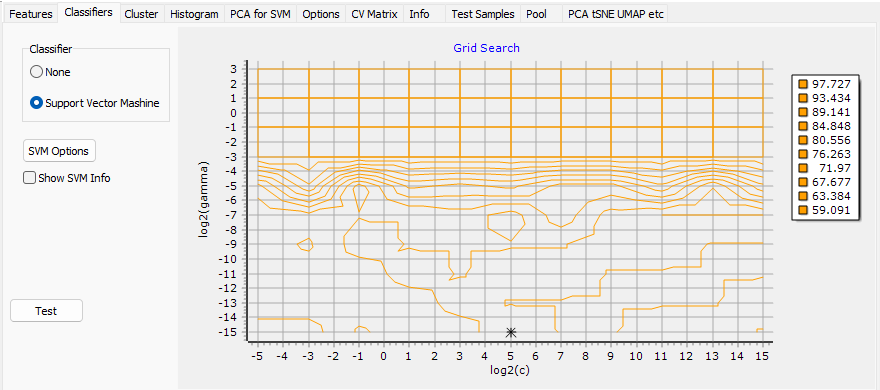
| Control | Does |
|---|---|
| Classifier | Support Vector Mashine is the classifier. None calculates the features and stops |
| SVM Options | Opens the options, below |
| Show SVM Info | Writes libsvm's own messages in the Log |
| Test | A check of libsvm itself: it trains on a problem file you choose, written in libsvm's format. It does not touch your model |
| Grid Search chart | What the parameter search found, below |
What Train does
Press Train the Classifier, the mortarboard on the Training Set toolbar. Baclan then:
- calculates the features of every ticked colony, with a progress window. Features already calculated with the same settings are not calculated again;
- works out the normalisation, the feature reduction and the principal components, as set on the Features tab;
- searches for the best SVM parameters and trains the SVM, with a progress window;
- runs the cross-validation.
Abort in a progress window stops the run, and leaves no trained model behind. With no feature ticked it says Select Features.
SVM Options
Set Defaults brings back the defaults: C-SVC, the Radial Basis Function kernel, and probability estimate.
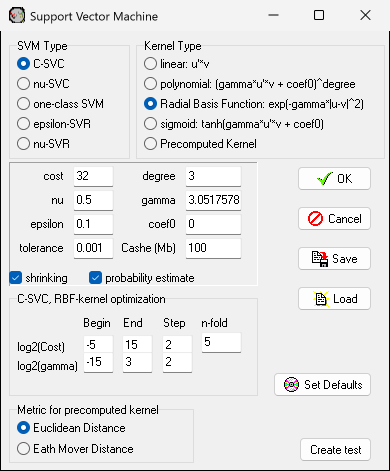
SVM Type
| Type | Use |
|---|---|
| C-SVC | Classes, with a cost for mistakes. The default, and the only type that gets the grid search |
| nu-SVC | Classes, with nu in place of the cost |
| one-class SVM | One class: does a colony belong to it or not? |
| epsilon-SVR, nu-SVR | Regression. Of no use for classes |
Baclan switches type by itself in two cases. With one class it goes to one-class SVM. With several classes and one-class SVM chosen, it goes to C-SVC, and says so.
Kernel Type
Radial Basis Function is the default. linear, polynomial and sigmoid are the other standard kernels, each with its formula in the dialog. Precomputed Kernel calculates the kernel from the distance between feature vectors, by the Metric for precomputed kernel chosen below: Euclidean Distance or Eath Mover Distance.
The numbers
| Field | Meaning |
|---|---|
| cost, gamma | C and gamma. For C-SVC with the RBF kernel the grid search replaces them with what it finds, and you can read them here afterwards |
| nu | For nu-SVC, one-class SVM and nu-SVR |
| epsilon | For epsilon-SVR |
| degree, coef0 | For the polynomial and sigmoid kernels |
| tolerance | When the solver stops |
| Cashe (Mb) | The solver's memory |
| shrinking | libsvm's shrinking heuristic |
| probability estimate | Makes Prob in the results table meaningful. Without it the column shows -1 |
C-SVC, RBF-kernel optimization
The grid of the search. C and gamma go up in powers of two, so these are exponents:
| Begin | End | Step | |
|---|---|---|---|
| log2(Cost) | -5 | 15 | 2 |
| log2(gamma) | -15 | 3 | 2 |
n-fold is how many parts each point of the grid is cross-validated in, 5 by default. A finer grid takes longer, in proportion to the number of points.
The buttons
OK keeps the settings, for this and later sessions. Save and Load keep them in a .svp
file. Create test writes a small libsvm problem file, for the Test button.
The Grid Search chart
The chart has log2(c) across and log2(gamma) up. Its contours join the points of equal
cross-validation accuracy, with the levels listed beside them, and a star marks the point chosen.
A star at the edge of the grid means the best point may lie outside it: widen the range and train again. Double-click the chart for its editor.