The Cytomat incubator
With a Thermo Cytomat automatic incubator beside it, BacBuster scans plates by itself: at the times you set, the Cytomat hands a plate out, BacBuster scans it and saves it, and the plate goes back to incubate - for as long as the experiment lasts, around the clock.
Turning it on
Tick Cytomat on the Service > Staff Only tab and restart BacBuster. The Cytomat button appears on the toolbar; it opens the Cytomat window. The Cytomat's serial port is chosen as Port on the window's Advanced tab - BacBuster opens it at start-up.
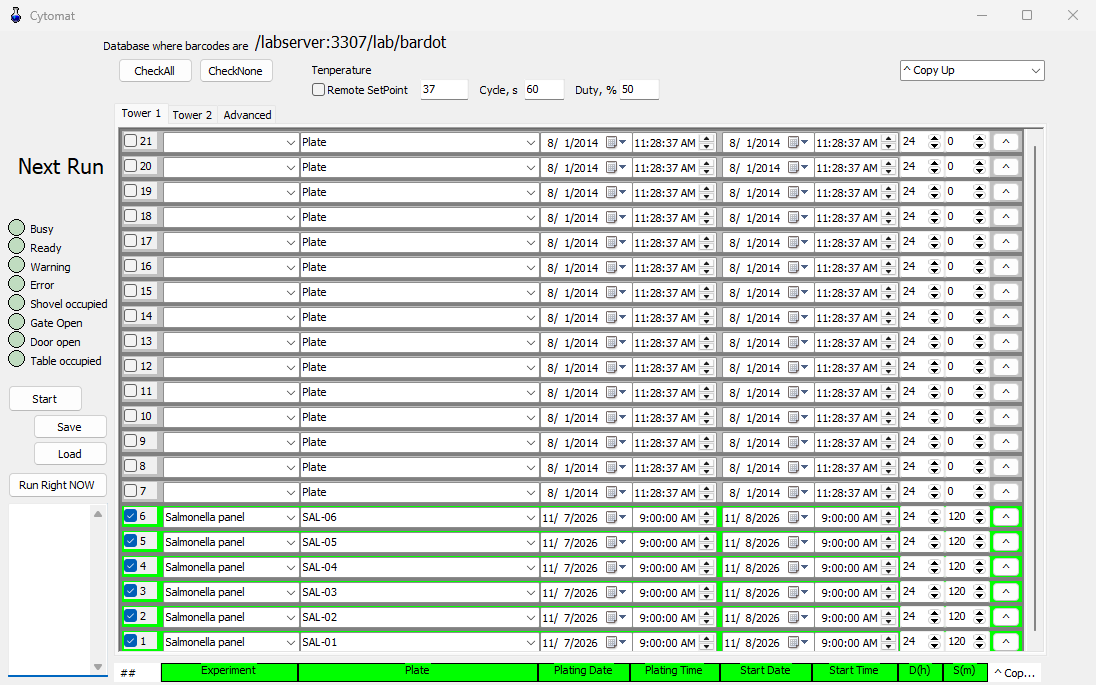
Places
The Cytomat holds two towers of 21 places, on the tabs Tower 1 (places 1-21) and Tower 2 (places 22-42); place 1 is at the bottom. Each place is one row:
| Column | Meaning |
|---|---|
| ## | Tick to use the place. Unticked places are left alone |
| Experiment | The experiment the plate belongs to; the list comes from the database the window names |
| Plate | The plate's name; the list holds the experiment's planned plates. Double-click it for the plate's details: user, organism, lab, medium, source |
| Plating Date, Plating Time | When the dish was plated; the incubation time saved with each scan counts from here |
| Start Date, Start Time | The first scan |
| D(h) | Duration in hours: no scans after start + duration |
| S(m) | Step in minutes between scans. 0 scans once |
| ^ | Copies the row to the next place - see below |
A place is scanned at the start time, then every step, until the duration is up. The row's colour shows its state, and Next Run at the top shows when the next scan of any place is due, with the time left.
Filling many places
The ^ button of a row copies it to the next ticked place. The list beside CheckAll chooses the direction:
| Choice | Effect |
|---|---|
| ^ Copy Up | Copies to the next ticked place above |
| ^^ Shift Up | Shifts all the rows above one place up, starting with this one |
| v Copy Down | Copies to the next ticked place below |
| vv Shift Down | Shifts all the rows below one place down |
Holding Shift, Ctrl or both while clicking picks Shift Up, Copy Down or Shift Down. The column headings choose what is copied: click a heading to copy only that column, click more headings to add them; when all are chosen, everything is copied. CheckAll and CheckNone tick and untick all places.
Running
| Button | Does |
|---|---|
| Start | Starts the schedule; the button becomes Stop. While it runs, most of the window cannot be edited |
| Run Right NOW | Scans every ticked place once, now, then carries on with the schedule |
| Save, Load | Save the schedule to a file, and load one |
Before starting, BacBuster checks the image options: Colorify, Raw Plate Image and Positive Image should be off for a run, and BacBuster offers to turn them off.
For each scan, BacBuster moves its stage to the loading position, the Cytomat puts the plate on
it, and BacBuster takes the plate image, scans the colonies and saves the plate to the database
under the place's experiment and name, with the user Cytomat and the incubation time since
plating. Then the Cytomat takes the plate back. When several places are due, the one most
overdue goes first.
The schedule is kept as it is changed. If BacBuster is closed during a run and started again, the window opens and the run carries on.
Plate out
While a plate is out of the Cytomat, no other is fetched. If a run was interrupted with a plate out, take it back by hand, then click the Plate Out button and confirm Click yes if Bardot device has no plate inside.
Status
The lights at the top turn red when:
| Light | Means |
|---|---|
| Busy | The Cytomat is moving |
| Ready | The Cytomat reports ready |
| Warning, Error | The Cytomat reports a warning or an error. An error also brings up the red warning button on BacBuster's toolbar and sends the e-mail alert |
| Shovel occupied | A plate is on the Cytomat's shovel |
| Gate Open, Door open | The Cytomat's gate or door is open |
| Table occupied | A plate is on the transfer table |
The box beside the lights logs what the Cytomat was told and answered.
Temperature
Temperature shows the Cytomat's temperature. With Remote SetPoint ticked, BacBuster keeps the Cytomat warm with the instrument's heater:
| Field | Meaning |
|---|---|
| Set point | The temperature to keep, °C |
| Cycle, s | The heater coil's cycle, 10 to 3600 s |
| Duty, % | The part of each cycle the coil is on, 25 to 100 % |
Below the set point the fan runs and the coil switches on and off in cycles; at the set point the coil stops, and the fan runs on for a few minutes to carry the heat away. The coil never runs without the fan. The settings are kept across restarts.
E-mail alerts
The Options tab has a box of e-mail addresses, one per line. When a run cannot save a plate or the Cytomat reports an error, BacBuster sends a message to each. Test Emails sends a test message.
The Advanced tab
For setting up and fault finding: the serial Port and Open; initialising the Cytomat and its motors; opening and closing the gate; moving the shovel to the table, back, or to the wait position; reading the status, errors and warnings and resetting errors; and Command / Send for commands typed by hand. Tick No Table Sensor if the table's sensor does not work.