Planned plates and the Project tab
An experiment can be planned before any dish is scanned: its plates are entered in the database with their names, barcodes, organisms and media, and their barcode labels printed. That is what ExpManager does, and the Project tab of BacBuster is ExpManager built in. Scanning a planned plate then takes one drag, or one barcode scan, to describe it.
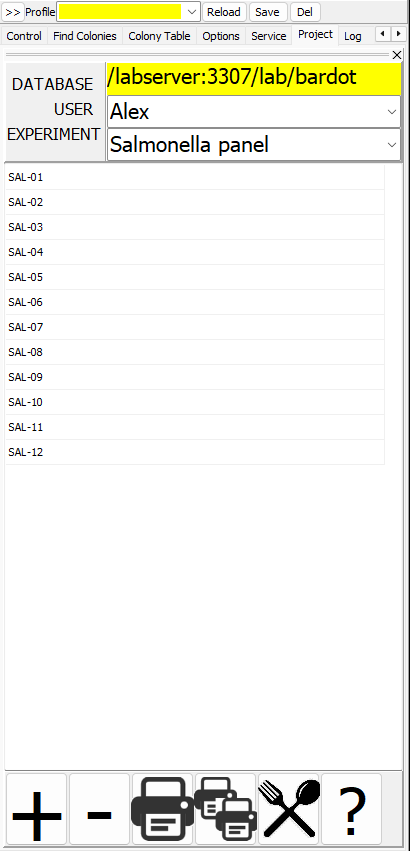
The Project tab
| Part | Meaning |
|---|---|
| DATABASE | The database the plans are in - the same as on the toolbar: choosing another in either place changes both |
| USER | Whose plates to show |
| EXPERIMENT | Which of that user's experiments |
| The list | The experiment's plates, by name |
| The buttons below | Add a plate, remove a plate, print the selected label, print all labels, settings |
The ExpManager manual describes the buttons and the label printer settings.
Describing a plate by dragging
Drag a plate's name from the list onto the BacBuster window - onto the plate image or the live views. BacBuster reads the planned plate's description from the database - its name, barcode, user, experiment, organism, medium, source and the rest - and makes it the description of the plate being scanned. The name appears above the plate image, and the plate turns yellow in the list.
Then scan as usual. Save plate shows the description already filled in, and Save To Database replaces the empty planned plate with the scanned one: a plate with the same name, barcode, user and experiment that has no image yet.
With two instruments on one computer, the plate of the second one shows in aqua.
Describing a plate by its barcode
With a barcode scanner, scan the dish's label instead of dragging. BacBuster finds the plate with that barcode in the database, switches the USER and EXPERIMENT of the Project tab to its experiment, highlights it, and takes its description as above.
In a Cytomat run
The Cytomat window offers the planned plates of each experiment as
names for its places, from the database it names. A run saves each plate under the name chosen
for its place, with the user Cytomat.