Reviewing scatter images
Before a plate is saved, look through its scatter images and leave out the poor ones: a colony hit off-centre, two colonies in the beam at once, a scratch or a bubble in the agar.
The thumbnails
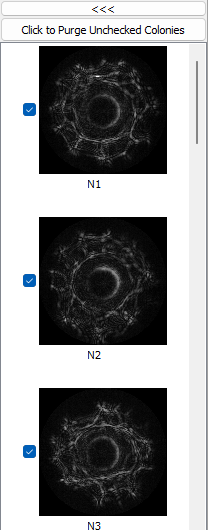
The column on the left shows one thumbnail per scanned colony, N1, N2 and so on, in the order they were scanned. Click a thumbnail to show its scatter image large in the panel next to the plate image, and to mark its colony on the plate image.
The tick box beside a thumbnail says whether the colony is kept. Untick colonies to leave them out; right-click the column for Select All and Deselect All.
Click to Purge Unchecked Colonies, above the thumbnails, removes the unticked ones from the plate for good. Unticked colonies that are not purged are saved with the plate, marked unticked, and Baclan leaves them out of its classes.
The grade
Each scatter image is graded as soon as it is taken, by a network trained on good and poor scatter images, from 0 (poor) to 1 (good). When the scan ends, colonies graded below My Goodness Level on the Control tab are unticked:
| My Goodness Level | Unticks colonies graded below |
|---|---|
| 0 | nothing |
| 5 (default) | 0.5 |
| 10 | everything but perfect ones |
Change the level and the ticks are set again at once - including any you set by hand. The grades are written on the Log tab.
The large image
The scatter image panel has two tabs: LDR, the normal image, and HDR, the high dynamic range image when Dynamic Range is High or Both. Colorify on the Options tab shows them in false colour.
The tables
The Colony Table tab lists every scanned colony: its number, position on the dish (X(mm), Y(mm)), Diameter, Roundness and the stage position it was scanned at (StageX, StageY). Right-click it to export it as text.
Starting again
- ReSnap on the Control tab replaces the selected scatter image - see Choosing colonies.
- Delete Samples removes all scatter images and keeps the plate image.
- Clear on the toolbar empties the plate altogether, after asking to save it.